
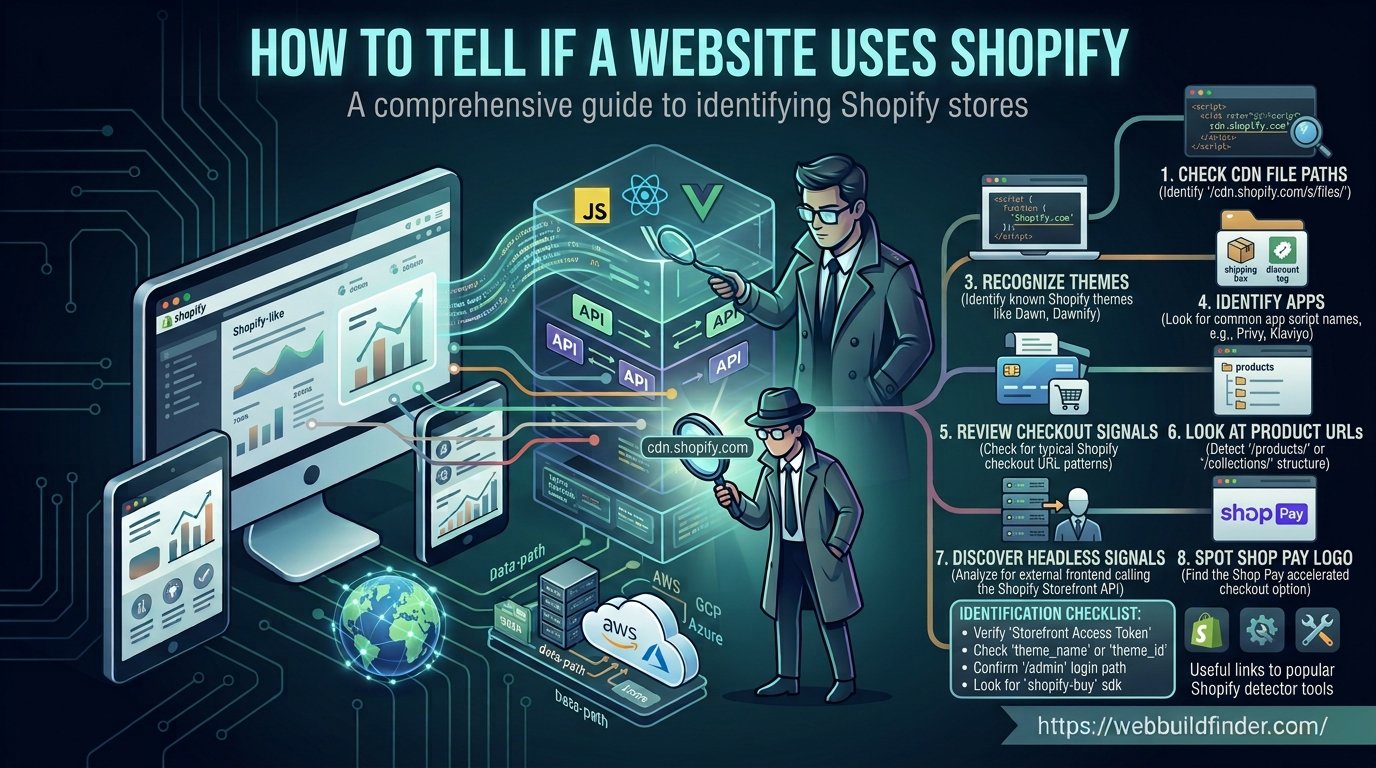
You find an online store with a clean design, smooth checkout experience and features you would like to understand. The first question that comes to mind is often simple: does this website use Shopify?
In many cases, you can find the answer without having access to the store's admin panel. Shopify storefronts leave several public technical signals that can help identify the platform.
Those clues can appear in image URLs, JavaScript, product pages, collection pages, cart behavior, theme files and apps loaded by the storefront.
There is one complication. Modern Shopify stores are becoming more flexible. A traditional Shopify theme may be easy to identify, while a headless Shopify store built with React, Next.js, Hydrogen or another frontend can hide many of the familiar Shopify signals.
This guide explains how to tell if a website uses Shopify, which signals are worth checking and how to avoid assuming a store uses Shopify based on one weak clue.
How Can You Tell If a Website Is Shopify?
Quick answer: You can tell if a website uses Shopify by checking its source code, CDN paths, JavaScript, product and collection URLs, cart behavior, theme assets and Shopify related storefront requests. For a faster check, you can use the WebBuildFinder Shopify technology detector to look for multiple publicly visible Shopify signals automatically.
Method 1: Detect Shopify Automatically
The quickest approach is to start with an automated technology scan.
Instead of manually searching hundreds of lines of HTML and JavaScript, a Shopify detector can look for several signals at once.
These signals may include:
- Shopify storefront assets
- Shopify CDN patterns
- JavaScript references
- Theme related markup
- Cart routes
- Product URLs
- Collection URLs
- Shopify app assets
- Analytics integrations
- Public storefront API activity
You can enter a domain into WebBuildFinder and use the report as your starting point.
Automated detection is useful because no single Shopify fingerprint appears on every store. Looking at several independent signals gives you a much better chance of reaching the correct conclusion.
Do Not Depend on One Signal
A URL that contains the word Shopify is useful evidence, but one isolated reference is not always enough.
A non-Shopify site might load a third party resource related to Shopify, while a headless Shopify store might hide nearly every obvious Shopify reference.
Try to confirm Shopify with at least two or three separate signals whenever accuracy matters.
Shopify CDN Signals
CDN resources are one of the most useful clues when investigating a Shopify storefront.
Shopify serves theme assets, images, CSS and JavaScript through its content delivery infrastructure.
Older Shopify detection guides often tell you to search only for cdn.shopify.com. That can still appear, but it should not be your only test.
Modern Shopify storefront assets can also be served through the store's own domain using paths similar to:
/cdn/shop/files/
You may find product images, theme files or uploaded media under Shopify related CDN paths.
Where to Look for CDN Signals
Open the website and use your browser developer tools.
Check:
- Image URLs
- JavaScript requests
- CSS requests
- Font files
- Network requests
- HTML source code
Search for terms such as:
shopify
/cdn/shop/
cdn.shopify.com
Several Shopify related assets across different parts of the storefront are strong evidence that Shopify is involved.
Why CDN Evidence Is Strong but Not Perfect
Assets can be cached, proxied or loaded by third party applications.
Some headless stores also host their frontend files somewhere completely different while using Shopify only for commerce data.
CDN signals should therefore be combined with product, cart, API or theme evidence.
Shopify JavaScript Objects
JavaScript can reveal useful information about an ecommerce platform.
Traditional Shopify themes and integrations may expose Shopify related variables, configuration data or script references in the page.
Open the page source or browser developer tools and search for:
Shopify
shopify
myshopify
You may find references connected with storefront configuration, localization, cart behavior, analytics, themes or installed applications.
Check Loaded JavaScript Files
Open Developer Tools and select the Network tab.
Reload the store and filter requests by JavaScript.
Look for files or domains that contain Shopify related patterns.
You may also find scripts generated by apps installed on the store.
Why JavaScript Detection Can Fail
Modern build systems minify and bundle JavaScript.
A developer can also build a custom storefront that communicates with Shopify on the server rather than directly from the browser.
In those cases, obvious Shopify JavaScript references may disappear even though Shopify still powers the ecommerce backend.
Shopify Checkout Signals
Checkout and cart behavior can provide additional clues.
Traditional Shopify storefronts normally use Shopify's commerce routes for actions such as adding items to the cart, changing quantities and moving customers toward checkout.
Common storefront routes can include:
/cart
/cart/add
/cart/change
/cart/update
You may see these requests when inspecting the Network tab while interacting with a product page.
Watch the Cart Requests
Open developer tools before adding a product to the cart.
Watch the network activity when you click Add to Cart.
If the storefront sends requests that match Shopify cart patterns alongside other Shopify evidence, your confidence becomes much stronger.
You do not need to place an order or enter payment information to investigate the storefront.
Headless Shopify Checkout
Headless storefronts work differently.
A custom frontend may manage the cart through Shopify's Storefront API and then send the shopper to Shopify's web checkout.
This means the page itself may not look like a normal Shopify theme even though Shopify still handles products, carts and checkout.
Product and Collection URL Structure
Traditional Shopify stores often use recognizable URL patterns.
A product page commonly looks similar to:
example.com/products/product-name
A collection may appear as:
example.com/collections/collection-name
You may also encounter:
/collections/all
/cart
/search
These paths can provide useful supporting evidence.
Do Product URLs Prove a Site Uses Shopify?
No.
Other ecommerce platforms can use similar URL structures, and developers can deliberately create routes that resemble Shopify.
Headless stores can also create completely custom product URL structures.
For example, a headless store could use:
/shop/product-name
/store/item/product-name
while Shopify remains the underlying commerce platform.
URL structure is therefore useful evidence, but it should never be the only evidence you use.
Shopify Theme Signals
Traditional Shopify storefronts are built around themes.
Theme files control the presentation of product pages, collections, navigation, sections and other parts of the online store.
Several storefront clues may point toward Shopify theme architecture.
You may find:
- Theme related CSS files
- Shopify section markup
- Theme JavaScript assets
- Shopify Liquid generated content
- Section identifiers
- Theme specific class names
Some Shopify themes generate HTML containing identifiers related to Shopify sections.
When these patterns appear together with CDN and cart evidence, they can help confirm the platform.
Can You Find the Exact Shopify Theme?
Sometimes.
A publicly visible theme may expose enough information to identify the theme name or match its assets to a known Shopify theme.
However, custom themes, renamed themes and heavily modified themes are much harder to identify.
If your goal is specifically theme research, read our guide on how to find what Shopify theme a store uses.
Shopify App Signals
Shopify stores often use apps for reviews, subscriptions, upsells, search, loyalty programs, analytics, customer support and many other features.
Apps that affect the public storefront may leave detectable evidence.
This can include:
- JavaScript files
- CSS files
- App blocks
- App embed blocks
- Third party domains
- Tracking requests
- Widget markup
- API requests
A review app, for example, might load a ratings widget on the product page. A customer support app may inject a chat button. An analytics app may add tracking code without displaying anything visible.
Modern Shopify apps increasingly integrate with themes through theme app extensions, app blocks and app embed blocks.
Not Every Shopify App Can Be Found
An app that works entirely inside Shopify's admin area or processes information only on the backend might leave no public storefront evidence at all.
If no public signal exists, an external technology detector cannot reliably identify the app.
For a deeper explanation, see how to find which apps a Shopify store uses.
How Headless Shopify Changes Detection
Headless commerce is one of the biggest reasons Shopify detection has become more complicated.
In a traditional store, Shopify handles both the ecommerce backend and the storefront theme.
In a headless setup, those layers are separated.
Shopify may still manage:
- Products
- Collections
- Inventory
- Pricing
- Carts
- Checkout
while a separate frontend displays the website.
The frontend might be built with:
- Hydrogen
- React
- Next.js
- Vue
- Another custom framework
Shopify's Storefront API allows custom storefronts to retrieve commerce information without relying on a standard Shopify theme.
What Headless Shopify Looks Like From the Outside
You may visit a store and detect Next.js or another frontend framework without finding normal Shopify theme assets.
That does not necessarily mean Shopify is absent.
Possible headless clues include:
- Shopify Storefront API requests
- References to a myshopify.com domain
- Shopify related GraphQL requests
- Shopify checkout behavior
- Commerce data originating from Shopify
Some of these requests may happen on the server, which can make Shopify difficult or impossible to identify from the browser alone.
Shopify vs Custom Ecommerce
A polished ecommerce website is not automatically a Shopify store.
It could use WooCommerce, Magento, BigCommerce, a custom application or a headless commerce platform.
When comparing Shopify with custom ecommerce, look for a combination of evidence.
SignalPossible Shopify EvidenceAssetsShopify related CDN or /cdn/shop/ pathsProductsTraditional /products/ URLsCollectionsTraditional /collections/ URLsCartShopify cart routes and behaviorThemeShopify theme and section patternsAppsShopify app storefront assetsAPIShopify Storefront API evidence
One matching row is interesting. Several matching rows are much more convincing.
How to Verify That a Website Really Uses Shopify
If the result matters, confirm Shopify using multiple independent signals.
A strong verification might include:
- Shopify CDN resources
- Shopify related JavaScript
- Product and collection structures
- Shopify cart behavior
- Theme signals
- Storefront API evidence
The more independent signals you find, the more confident you can be.
This approach also reduces false positives caused by third party widgets, cached files or old code.
Test the Store With WebBuildFinder
You can perform every check manually, but doing that across multiple stores quickly becomes repetitive.
WebBuildFinder gives you a faster starting point.
Enter the website address into the Shopify technology detector and review the publicly detectable signals found on the store.
You can then investigate important findings manually if you need more confidence.
If you are researching the broader technology stack rather than Shopify alone, read how to find out what technology a website uses.
Frequently Asked Questions
How can I check if a website is built with Shopify?
Check the site's source code, CDN resources, product URLs, collection URLs, JavaScript, cart requests and theme assets. You can also use a Shopify detector such as WebBuildFinder to check several public signals automatically.
Does every Shopify store use /products/ and /collections/ URLs?
No. These paths are common on traditional Shopify storefronts, but headless Shopify sites can use custom URL structures.
Does cdn.shopify.com prove a store uses Shopify?
It is useful evidence but should be confirmed with other Shopify signals. Modern Shopify storefront assets can also be served using the store's own domain under Shopify CDN paths.
Can a Shopify store hide that it uses Shopify?
Yes. Headless architecture, custom frontends, proxies, optimized assets and server side API communication can remove many obvious Shopify fingerprints.
Can Shopify and Next.js be used together?
Yes. Shopify can provide products, carts and checkout while Next.js handles the frontend. This is an example of headless commerce.
Final Thoughts
There is no single test that identifies every Shopify store.
Traditional stores are often easy to recognize through CDN assets, product routes, cart behavior and theme files. Headless stores can require a much deeper investigation.
The best approach is to combine several independent signals rather than relying on one URL or JavaScript reference.
For a fast first check, scan the website with WebBuildFinder and then verify important findings manually.